Hugse — Personal Health Records
A lab sends a PDF. A doctor writes a note. A watch records sleep and heart rate. Before the next appointment, the patient has to find each piece and explain what changed.
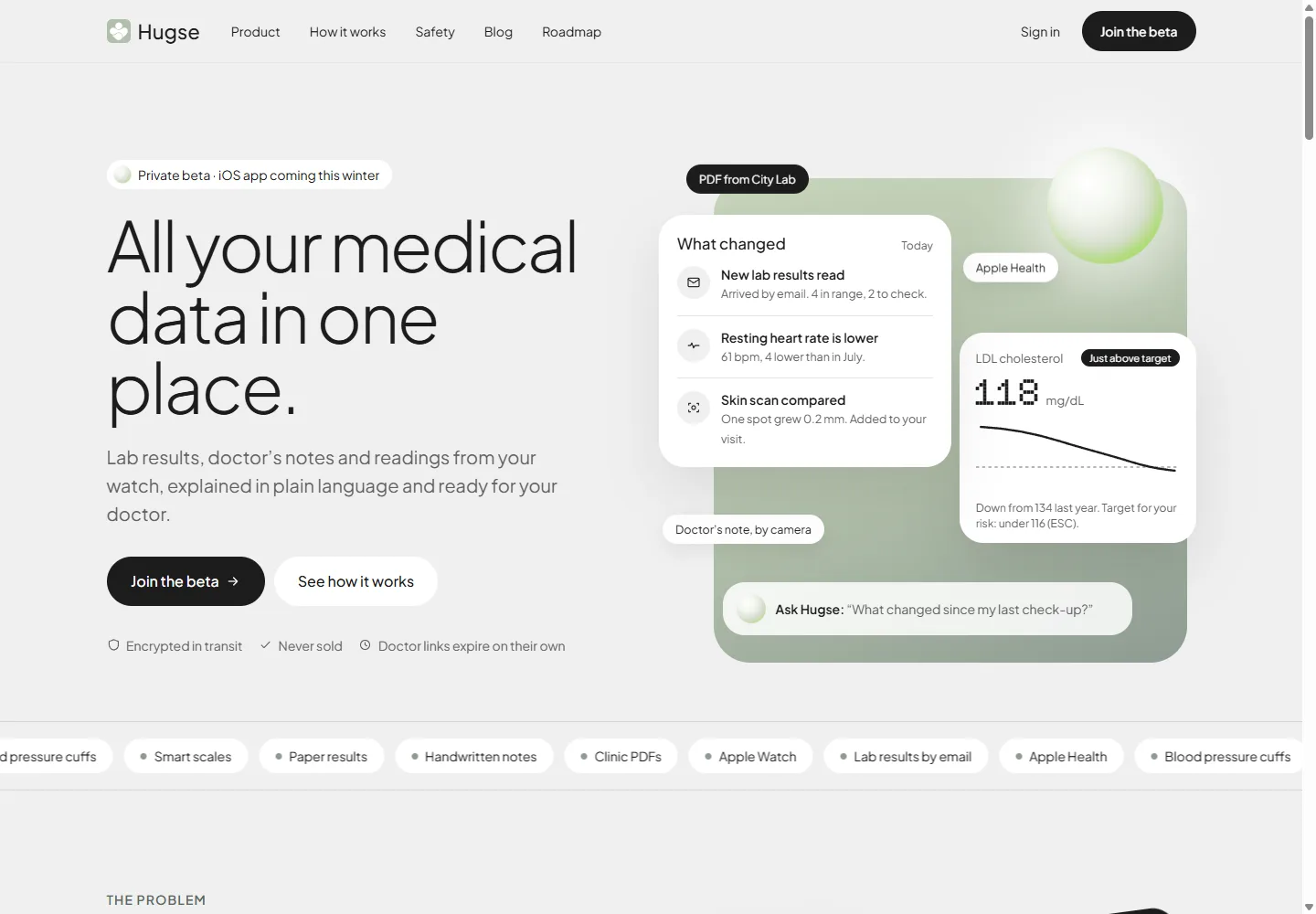
Hugse is a personal health platform organised around that task. Its public product presentation brings medical documents, extracted values and everyday readings into a shared timeline, with the original source behind each number. The product is in private beta; the iPhone app is described as forthcoming.
Visit hugse.io · Read about designing personal health records
Who Hugse is for
People receiving records from more than one place. A laboratory report, a specialist’s note and readings from a watch may all be relevant to the same appointment. Keeping them together reduces the preparation needed to find the right document again.
People following changes across repeated tests or visits. A dated history helps someone identify what to discuss without relying on memory or opening every file individually.
People who want to arrive with organised questions. The useful output is a focused summary that a clinician can review alongside the original documents.
Hugse is a record-management and explanation product. Diagnosis, treatment decisions and urgent medical assessment require a qualified clinician.
Why the product exists
A folder can preserve documents, but the patient still has to open each file, find the relevant result and explain how it relates to an earlier one. Readings in a separate app add another source to review.
Hugse combines storage with a structured view of the information. Values and dates can appear in a timeline while the original document remains available. The person can move from an overview back to the evidence behind it.
This connection is the central product decision: an explanation needs a visible source, and an uncertain reading needs a way to be checked.
What Hugse offers
The public beta presentation describes five connected parts:
- Document collection: a personal inbox for clinic results, PDF upload and paper scanning, alongside Apple Health connections.
- Structured results: values, units and laboratory reference ranges, with confirmation requested for unclear readings.
- A view of changes: recent documents and differences shown before the longer record.
- Questions grounded in the record: explanations presented with sources that the user can inspect.
- Visit preparation: selected changes, patient questions and supporting files brought into a shareable summary.
The site also presents guided skin-photo tracking and mobile capture workflows. The iPhone app is described as upcoming, so someone joining the beta should confirm which features are included in their invitation.
How the record becomes useful
Collect the record where it already exists
The intake routes reflect how patients receive information: email from a clinic, a PDF upload, a photograph of paper results and Apple Health readings. Hugse presents a personal inbox address so a clinic can send results directly.
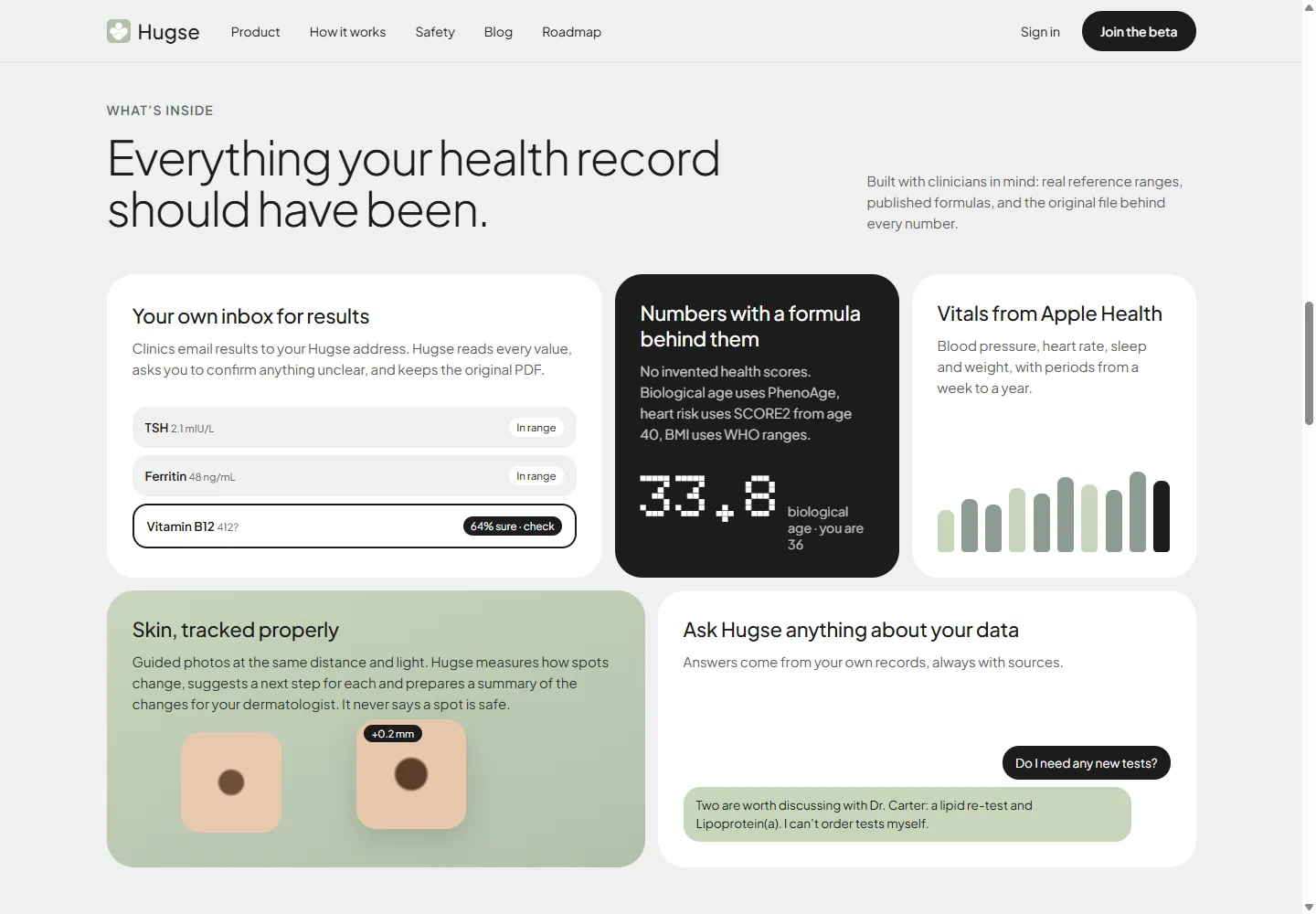
The interface gives extraction uncertainty a visible place. One example flags a value for confirmation instead of displaying it with the same confidence as a clearly read result. It also keeps the source file available. The patient needs a way to check a number before relying on its explanation.
Explain changes without hiding the evidence
The homepage opens with a short account of what changed: new results, a trend in resting heart rate and a comparison to an earlier record. Each item gives the reader a place to start before they inspect a longer history.
Hugse’s stated approach uses the laboratory’s reference ranges and identifies the formulas behind calculated metrics. Its question-and-answer feature is presented as working from the patient’s own records, with sources attached. These are useful product constraints: the explanation should remain connected to something the patient and doctor can inspect.
Prepare something a doctor can use
The visit-summary concept combines changes, patient questions and original documents on one page. Sharing controls include a read-only link, expiry options and revocation. A patient can choose which information to share rather than send their whole record by default.
That gives the product a concrete output. After collecting documents and reviewing changes, the patient has something to take into an appointment.
State the boundary in the interface
Hugse’s public safety language says it explains information and helps prepare questions; treatment decisions stay with the patient and clinician. The skin-tracking feature is described as recording changes for review and explicitly avoids declaring a spot safe.
Hugse compared with other ways to keep health records
Each option serves a different part of the task. The choice depends on where a person’s information comes from and what they need to do with it.
| Option | What it is useful for | Work the patient may still need to do |
|---|---|---|
| Hugse | Reviewing documents and readings together and preparing a visit summary | Confirm unclear information and discuss clinical decisions with a doctor |
| A clinic or laboratory portal | Accessing records supplied by that provider | Combine material from other providers and separate apps |
| A cloud folder or email archive | Keeping copies of original files | Find results, compare dates and assemble a summary manually |
| A watch or fitness dashboard | Reviewing readings collected by connected devices | Bring in medical documents and appointment context |
Questions before joining
Is Hugse a replacement for my doctor?
No. Its stated role is to explain records and help prepare questions. Diagnosis and treatment decisions remain with the patient and clinician. A well-organised record supports that conversation.
How can I check an extracted result?
Original documents are retained in the presented workflow, and unclear readings are flagged for confirmation. Check the source, date and units before using a value in a comparison. An extraction interface does not, by itself, establish a clinical accuracy rate.
What should I review before sharing a record?
Check which files and values are included, who will receive access and when the link expires. Hugse presents selection, read-only access, expiry and revocation as separate controls. Review the selected information each time you prepare a summary for a different appointment.
What this case demonstrates
A personal health record needs to support the whole preparation task, from an incoming document to a useful conversation with a clinician. Source preservation, confirmation states and sharing controls connect that journey. These are the information and workflow problems addressed through our software development and UI/UX design work.
Screenshots show Hugse’s public website in October 2026. The interface contains illustrative health data.